Muse AI APK
Muse from Meta — the personal AI agent by Meta Platforms, Inc. Choose the Android APK or Google Play, use the App Store for iPhone, or install Muse on Mac.
Android: 8.0.0.21.168
iOS: 8.1
Android APK: 8.0.0.21.168 · Mac DMG: 3.0. File details checked September 24, 2026; see the download information below.
Developer
Meta Platforms, Inc.Official publisher
Android package
com.facebook.auraVerify this before installing any file
Download source
APK + app stores + MacChoose the format for your device
Availability
US confirmed · Canada reportedChecked Sep 23, 2026
About
What is Muse AI?
“Muse AI” is the name most people search for — the app itself is called Muse from Meta, a personal AI agent developed by Meta Platforms, Inc. and launched in September 2026. Instead of just answering questions, it carries out everyday tasks for you: managing email and scheduling, booking dinners and reservations, tracking spending, comparing prices, building workout and meal plans, and more.
It works in the background, keeps going after you close the app, and asks for your approval before anything sensitive happens. It connects to the apps you already use — Gmail, Calendar, Instagram, Facebook, health and finance apps — and you stay in control of every connection, with a full activity log you can review at any time.
Make sure you get the real app. The genuine product is published by Meta Platforms, Inc. as “Muse from Meta” (Android package com.facebook.aura). Several unrelated apps also use the name “Muse AI” — always check the developer name before installing anything.
App information
Muse AI APK Information
Android and Mac file details below were read from the supplied installers. Store information is shown separately; check the store listing for current availability.
App name
Muse AI APK Store name: “Muse from Meta”
Developer
Meta Platforms, Inc.
Android package
com.facebook.aura
Latest version
Android APK: 8.0.0.21.168 · Mac: 3.0 · iOS: 8.1 APK/DMG metadata checked September 24, 2026; iOS listing checked September 23, 2026
Last updated
September 2026
Requirements
Android 10+ (ARM64 APK) · iOS 18+ · macOS 14+
Category
Productivity
Platforms
Android · iOS · macOS · Web Official hub: muse.ai
Availability
United States confirmed · Canada reported Canada not officially confirmed by Meta; other countries not announced
Features
What the Muse AI App Can Do
Verified capabilities from Meta’s official product materials — no filler, no speculation.
Gets things done for you
Books dinners, manages email, fills out forms, plans trips — it sees multi-step tasks through from start to finish.
Keeps working in the background
Continues tasks after you close the app, then notifies you when it needs a decision or something changes.
Connects the apps you use
Links Gmail, Calendar, Instagram, Facebook, health and finance apps. You approve every connection.
You’re always in control
Approval cards appear before sensitive actions. A full activity log lets you review everything — revoke anytime.
Saves you money
Tracks spending, audits subscriptions you forgot about, compares prices and alerts you to price drops.
Personal to you
Remembers your preferences and gets smarter with every connection — while you stay in control of each one.
Preview
Muse AI App Screenshots
Official screenshots from the App Store listing — this is what the app actually looks like.
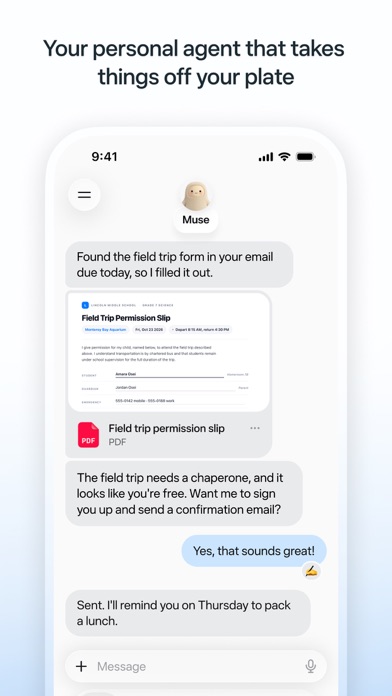
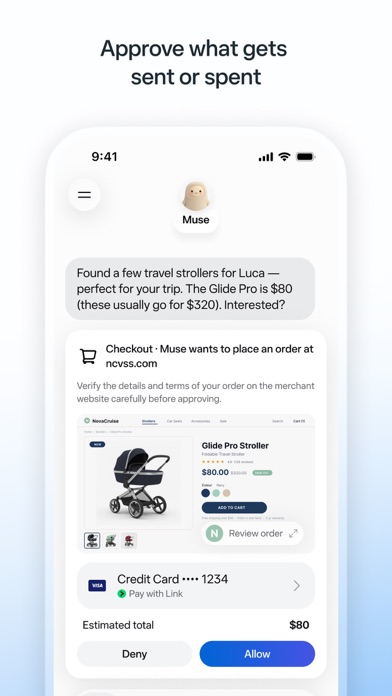
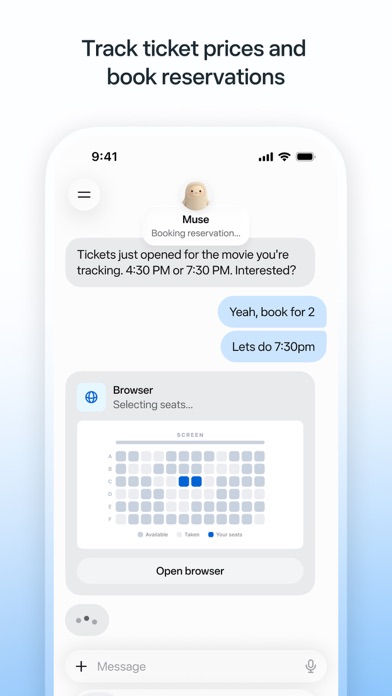
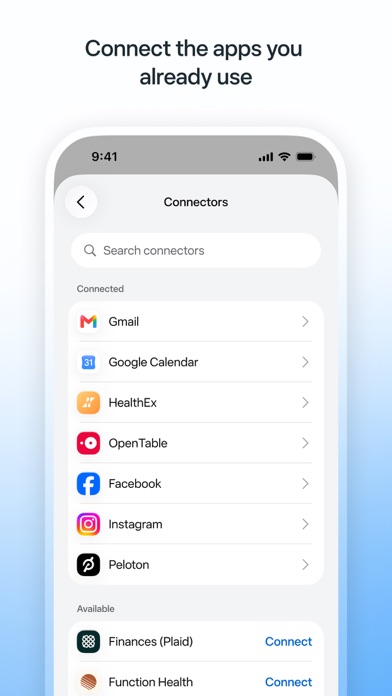
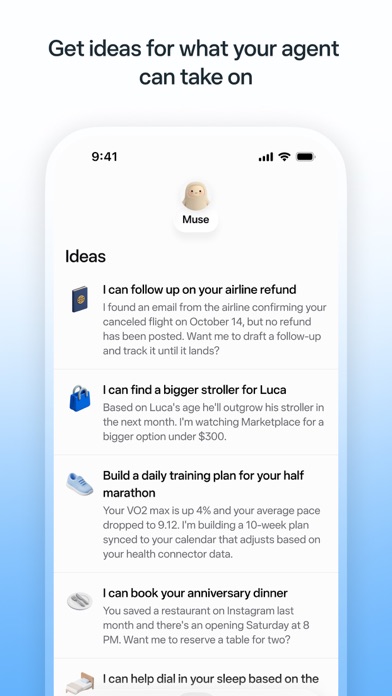
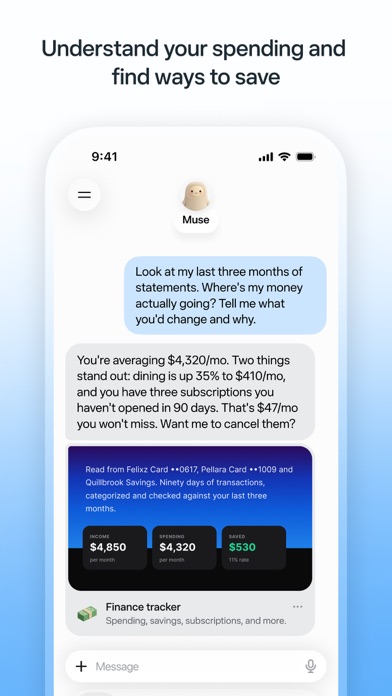
Screenshots: Meta Platforms, Inc., via the official App Store listing.
Download
How to Download the Muse AI APK
Choose your platform, download the correct file, then follow the installation steps below.
Option 1 — Android APK. Choose Download APK for the Android installation file. The supplied build requires Android 10 or later and an ARM64 device.
Finish downloading before installing. Wait until the APK download completes, then locate it in your browser’s downloads or file manager. Follow the Android installation steps below.
Option 2 — Google Play. Android users can install through the official Google Play listing instead. Open the listing and tap Install if the app is available for your device and region.
iPhone or Mac. Use the App Store for iPhone. On Mac, choose Download for Mac for the DMG file, then follow the Mac installation steps below.
Prefer the store? Install with Google Play.
Download File Information
These details describe the supplied Android APK and Mac DMG. Checksums identify the exact files; they are not a safety guarantee.
APK file
com.facebook.aura_8.0.0.21.168-1061301140_minAPI29(arm64-v8a).apk
APK version / build
8.0.0.21.168 / 1061301140
APK size
40,074,136 bytes (40.07 MB)
Package / architecture
com.facebook.aura / arm64-v8a
APK SHA-256
24fc2b1e07a31ac784bbcdb1b4aaf75b62e306ee9eca2e01c7e969ee75daa918
Mac file
Muse-3.0.dmg
Mac version / bundle
3.0 / com.meta.endo
Mac size
35,378,915 bytes (35.38 MB)
Mac SHA-256
3818f35b89580d857f412977f6d8f5d409dbc3112da3e7119ea254d518010de4
File source
Files supplied by the site owner; package/app metadata and SHA-256 checked September 24, 2026.
Install
How to Install Muse AI
Follow the steps for your device. Downloading a file and installing the app are separate steps.
Install on Android
- Download: tap Download APK and wait until the entire file has downloaded.
- Open: find the APK in Downloads and open it using your browser or file manager.
- Permission: if Android asks, allow “Install unknown apps” only for the browser or file manager you are using for this installation.
- Install: tap Install and wait for the process to finish.
- Set up: open Muse, sign in and complete the on-screen setup.
Keep Play Protect and device security enabled. You can turn off the browser/file manager’s installation permission afterward. Alternatively, install through Google Play without handling an APK.
Install on iPhone
- Tap the Download for iPhone button to open the App Store listing.
- Press Get (requires iOS 18.0 or later).
- Open the app and sign in to start using it.
There is no sideloadable iPhone file — APKs don’t work on iOS. Any site offering an “iPhone APK” is not offering Meta’s app.
Install on Mac
- Click Download for Mac and wait for Muse-3.0.dmg to finish downloading.
- Open the DMG disk image in Finder.
- Follow the installation instructions shown in the disk image. If it presents an Applications shortcut, drag Muse into Applications.
- Open Muse from Applications, then sign in and complete setup.
The supplied Mac app is version 3.0 and requires macOS 14 or later. Follow macOS security prompts; do not disable Gatekeeper.
Availability
Muse AI Availability & Supported Countries
Muse AI is rolling out region by region. Here’s what’s confirmed — nothing more, nothing less.
| Country | Android | iPhone | Status |
|---|---|---|---|
| United States | Available | Available | Confirmed at launch |
| Canada | Reported | Reported | Reported — not officially confirmed by Meta |
| All other countries | Not confirmed | Not confirmed | No dates announced by Meta |
Last checked: September 23, 2026. We update this table whenever Meta confirms a new region.
Regions
Not Available in Your Country Yet?
Meta is rolling Muse out region by region, so the listing may simply not appear in your country’s app store yet. When Meta announces a new country, we’ll add it to the availability table above.
Android APK installation is separate from service availability. Installing the APK does not necessarily bypass account, server-side, service or regional restrictions, and does not guarantee that Muse will work in every country.
FAQ
Muse AI APK FAQs
Straight answers to the questions people actually ask.
What is the Muse AI APK?
The Muse AI APK is the Android installation file for Muse from Meta, the personal AI agent by Meta Platforms, Inc. Use the APK installation route or install through Google Play. iPhone uses the App Store, while Mac uses a separate DMG installer.
What version is the Android APK?
The supplied Android APK is version 8.0.0.21.168 (build 1061301140), package com.facebook.aura. It requires Android 10 or later and ARM64 (arm64-v8a). Its metadata was checked on September 24, 2026.
Is Muse AI available on iPhone?
Yes. Use the official Muse from Meta listing on the Apple App Store for iPhone running iOS 18 or later. APK and DMG files do not install on iPhone; this page does not offer an IPA.
Which countries support Muse AI?
The United States is confirmed. Availability in Canada has been reported but not officially confirmed by Meta. Meta has not announced dates for other countries. Downloading or installing a file does not guarantee service access in your region.
Why isn’t Muse AI in my country’s app store?
Muse is rolling out region by region, so store availability can differ. Installing an Android APK does not necessarily bypass account, service, server-side or regional availability restrictions.
Is the Muse AI APK safe to download?
Check the source, package name, version and SHA-256 checksum before installing. The supplied file identifies itself as com.facebook.aura, version 8.0.0.21.168. A matching checksum confirms a match to that file; it does not by itself prove publisher identity or guarantee safety. Keep Android security protections enabled. Google Play remains an alternative.
Who developed Muse AI?
Meta Platforms, Inc. developed and launched Muse (Muse from Meta) in September 2026.
How do I install the Muse AI APK?
Finish downloading the APK, then open it from Downloads. If Android asks, allow Install unknown apps only for the browser or file manager used for this installation. Tap Install, wait for completion, then open Muse and sign in. Keep Play Protect enabled and turn off the installation permission afterward if you no longer need it.
Do I need an account to use Muse AI?
Yes — you sign in when you open the app for the first time. Sign-in options may vary by region and can change as Meta updates the app.
How do I install Muse on Mac?
The supplied Mac installer is Muse-3.0.dmg and contains Muse 3.0 for macOS 14 or later. Download the DMG, open it in Finder and follow the instructions in the disk image. If it shows an Applications shortcut, drag Muse there. Open Muse from Applications and complete sign-in and setup.
Ready to Try Muse AI?
Get the latest version of Muse from Meta — the personal AI agent that takes things off your plate.
Android APK 8.0.0.21.168 · Mac DMG 3.0 · Google Play and App Store alternatives.